When you sign up at a gym, they hand you a generic routine in a mobile app that doesn’t account for your progress, injuries, or how you’re feeling that day — and none of that carries over to planning the next session. What about those days when you just don’t feel like going? The ideal solution is an AI agent that takes all of that into account to plan your next workout, and that nudges and motivates you on the days you’d rather skip. And ideally: free, and private.
For me, the answer was obviously yes. So I decided to build my own — and learn a lot along the way!
The idea
I wanted a training assistant that actually knew me: my goals, my history, what I’d done the previous week, whether I’d slept badly, whether I was in a strength or a cutting phase. And that, based on all of that, would suggest a plan for the day. Plus, it had to be able to send me motivational Telegram messages reminding me it was time to train, and asking me to report back.
Nothing a human coach can’t do. But I wanted it done by an AI agent I controlled completely, without sending my personal data to any external server, and without paying yet another monthly subscription.
I called the resulting agent Carson (yes, like the butler from Downton Abbey) — my local AI personal trainer.
The ingredients
Here’s the stack, explained as simply as possible:
Ollama is a tool that lets you run AI models directly on your own computer or server, with no internet connection required. It acts as the AI engine — Carson’s brain. I used the llama3.2:3b model, a compact version that runs on modest hardware.
n8n is a visual automation platform, similar to Zapier or Make, but one you can install on your own server. I used it to design all the workflows: when the bot runs, what data it collects, how it passes that to the AI, and what it sends back to the user.
PostgreSQL is the database where everything is stored: the user profile, logged training sessions, and the history of generated plans.
Telegram is the interface. I didn’t build any app — I simply created a Telegram bot that I chat with to log workouts, request my daily plan, or receive reminders.
Proxmox is the system I run at home to virtualise servers. The whole stack runs in lightweight containers on my home server, with no dependency on any cloud provider.
Cloudflare Tunnel — and here’s the detail nobody tells you about.
When you install n8n on your own server, it’s completely isolated from the outside world. It has no public URL. Your router doesn’t know it exists, your home IP changes periodically, and even if you wanted to forward a port so Telegram could reach it, you’d be exposing your home network directly to the internet.
The problem is that Telegram works via webhooks: when someone messages your bot, Telegram needs to call your URL to deliver the message. If n8n has no public URL, the bot receives nothing.
Cloudflare Tunnel solves this cleanly. Instead of letting the outside world reach your server, your server opens an outbound connection to Cloudflare, which acts as the relay. The result: a stable public HTTPS URL, no open ports, no exposed IP, and completely free for this use case.
This step is missing from most n8n + Telegram tutorials, and it’s exactly where most people get stuck wondering why their bot never responds.
How it works in practice
When I wake up in the morning, Carson already knows what I did yesterday. If I logged any activity on Strava (running, cycling, tennis…), it takes that into account. It also considers what my last training session was and how the progression is going.
The basic flow looks like this:
1. Retrieve current profile and goals from PostgreSQL
2. Query recent training history (last 7 days)
3. Fetch the latest Strava activity (distance, effort, type)
4. Build a prompt with all that context
5. Send it to Ollama → get the training plan
6. Deliver the plan to the user via Telegram
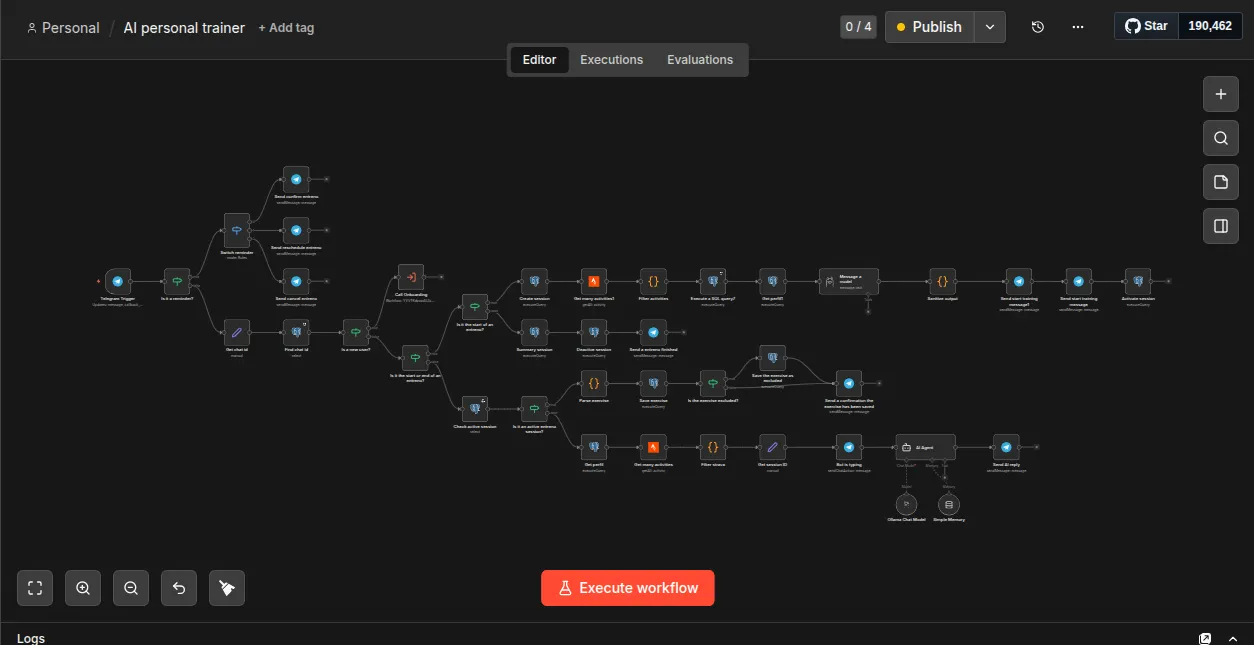
It also has an onboarding flow for new users: it asks a series of questions to understand their goals, fitness level, available equipment, and preferences. All of that gets stored and the AI uses it in every subsequent interaction.
When training time comes around, a series of motivational messages from the AI agent arrive to encourage me to train that day.
What I learned
Automating complex workflows is more accessible than it looks. n8n has a reasonable learning curve and lets you connect very different pieces with barely any code. The most interesting part was designing the context passed to the AI well — a vague prompt gets a vague response.
Small models have real limits. llama3.2:3b is impressive for the hardware it requires, but honestly its responses tend to be generic and it doesn’t consistently follow the output format you ask for. If you want better quality, you need a larger model, and that means more hardware.
n8n is more powerful than it looks at first glance. The visual workflow editor makes iteration very fast. The hard part wasn’t building the automation — it was designing the data model and conversation flow so that context accumulated correctly over time.
The cost of privacy. Running everything locally means you’re the system administrator. If something breaks, you fix it. That’s the price of owning your data.
Is it worth building?
If you’re a technical person curious about AI and self-hosting, absolutely yes. Not just for the end result, but for everything you learn along the way: automation, language models, prompt design, API integration.
If you’re looking for an AI trainer without the technical overhead, a tool like ChatGPT with a well-crafted prompt will probably give you comparable results with far less effort.
But where Carson has no competition is privacy and long-term cost. My training data never leaves the house. No subscription to cancel, no API costs, and no terms of service that change overnight.
The full workflow
If you want to set it up yourself, here’s the workflow ready to import directly into n8n:
Once imported you’ll need to reconnect your own Telegram, Ollama, PostgreSQL, and Strava credentials. The Call Onboarding node I leavee it to you so you can practise.